

The inq smartpen is designed to bring note taking, audio recording, and analysis into a single workflow. From my experience, it handled most of those core tasks well. However, I experienced enough hiccups along the way to say that my experience with this pen was not exactly perfect.
One of the first things I noticed was the audio experience. The pen itself does not handle recording directly, so I had to rely on a connected device (in my case an iPhone). The recording quality was great, but of course your results will vary depending on what type of device you have. What I was particularly impressed with was the transcription tool. The audio-to-text conversion was consistently accurate, which would make it especially useful for meetings, lectures, and interviews.
When it comes to handwriting, I found the inq to be quite effective for basic handwritten note to text conversion. It’s worth noting too that this pen doesn’t require specialized paper, making it a more flexible and universal tool than other smartpens.
That said, I did run into some frustrations during setup. The biggest challenge for me was around account setup and platform compatibility. Even after repeated attempts, the email verification on my laptop failed, which prevented me from using the inq companion app on my PC. I also found it frustrating that I had to sign in on the same device that I used to pair the pen. These were definitely my biggest gripes with the inq, and it made cross platform use feel restricted, especially when compared to other smartpens that handle multi-device access with ease.
As I spent more time with the app, I noticed a few usability issues as well. Some of the tools were not as intuitive as I expected, although I will say the built-in Help feature was clear and easy to follow when I needed it. The search function worked, but only at a surface level. It could tell me which notes contained a keyword, but it wouldn’t show me exactly where that word appeared in my document.
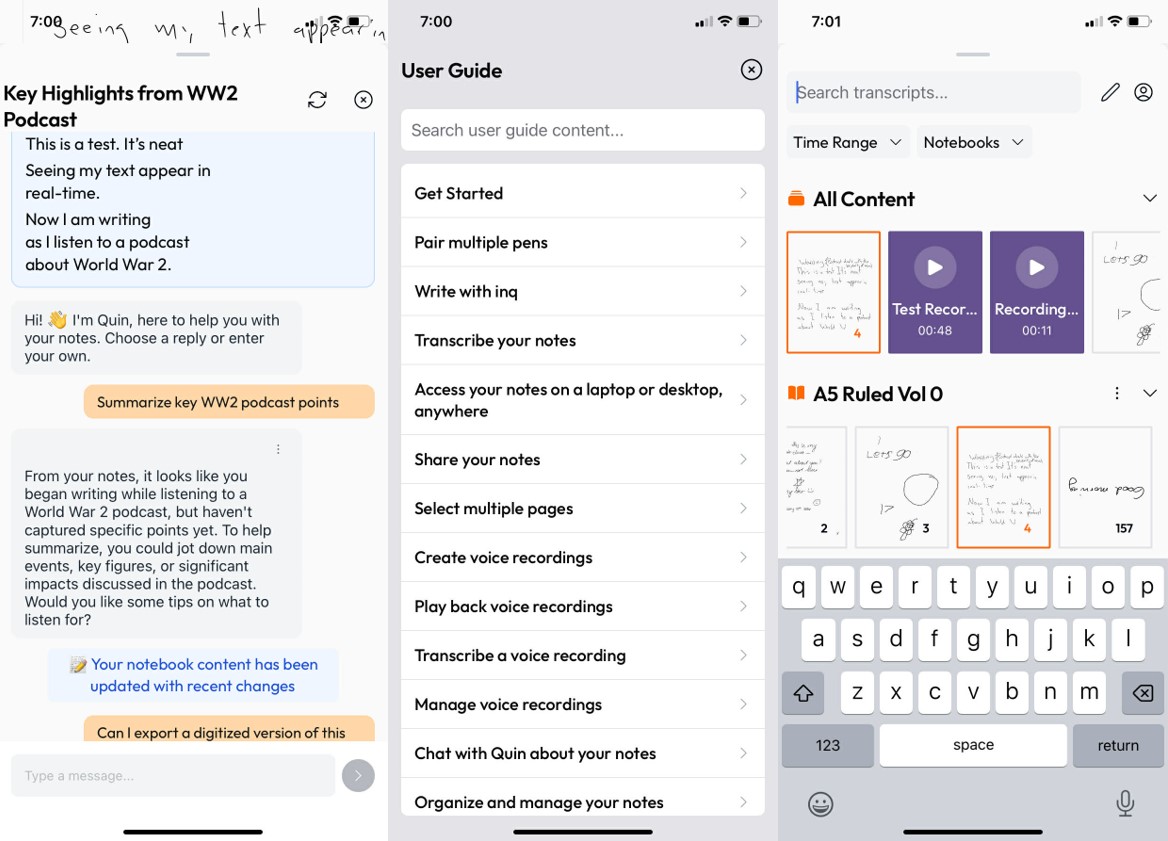
I also experimented with the AI features, including Quin AI, and had mixed results. At first, I couldn’t get the built-in AI to run properly, but after a few tries I got it working, and I was able to interact with the chatbot and ask it questions about the notes I was taking. Sharing my notes was another area where I ran into trouble. Email sharing did not work for me, but I was thankfully able to send notes through a messaging app as a workaround.
Priced at $225 CDN, the inq smartpen (new window) is a decent starter-level smartpen. It’s a capable tool for simple note taking and transcriptions, but it doesn’t come without frustrations. If you’re using one device and aren’t picky about how you share your notes, this pen might be completely fine for you, but if you’re looking for seamless sharing and cross platform access, you might want to look elsewhere.
This post originally appeared on the AT Help Desk (new window) website.