
LipSync Update: Mounting Refined
We’ve further refined our DIY (do-it-yourself) mounting set-up that used 3D printed clamps and arrow shafts to create something that looked like a microphone stand.

We use technology, knowledge and passion to empower Canadians with disabilities.
Skip to Navigation We’ve further refined our DIY (do-it-yourself) mounting set-up that used 3D printed clamps and arrow shafts to create something that looked like a microphone stand.

Over the last few weeks, we have shown you 3D printed parts, the joystick, design plans, and the electronics, but one thing we haven’t had a chance to show you is an assembled prototype of the LipSync itself — you’ve seen the parts, but not the whole. Well, here’s a look.

Originally, the LipSync would just connect to the phone via USB. But one side effect of this, is that you would be dealing with the cord — say you wanted to put the LipSync a little farther from the phone, you would have to deal with the cord across your body. We needed a way to make the LipSync be able to connect to your phone wirelessly.
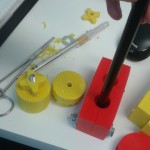
One of the big decisions we are currently working on right now is how do we mount the LipSync to wheelchairs (along with mounting the mobile device). There’s a lot of variables. Physically, you can’t add to the width of the wheelchair, and we’ve got to make sure our mount is safe for the user. But we’ve also got to consider the cost for both the user and maker, as well as practicality.
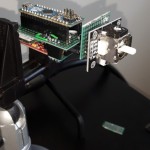
With the LipSync, the user is able to move their cursor and navigate around their smartphone using a mouthpiece instead of needing to use their hands or fingers. But how is this done? With a joystick.